

1.预加载图片(function($){varcache=[];//Argumentsareimagepathsrelativetothecurrentpage.$.preLoadImages=function(){varargs_len=arguments.length;for(vari=args_len;i--;){varcacheImage=document.createElement('img');cacheImage.src=arguments[i];cache.push(cacheImage);}}jQuery.preLoadImages("image1.gif","/path/to/image2.png");2.让页面中的每个元素都适合在移动设备上展示varscr=document.createElement('script');scr.setAttribute('src','https://ajax.googleapis.com/ajax/libs/jquery/1.5.2/jquery.min.js');document.body.appendChild(scr);scr.onload=function(){$('div').attr('class','').attr('id','').css({'margin':0,'padding':0,'width':'100%','clear':'both'});};3.图像等比例缩放$(window).bind("load",function(){//IMAGERESIZE$('#product_cat_listimg').each(function(){varmaxWidth=120;varmaxHeight=120;varratio=0;varwidth=$(this).width();varheight=$(this).height();if(width>maxWidth){ratio=maxWidth/width;$(this).css("width",maxWidth);$(this).css("height",height*ratio);height=height*ratio;}varwidth=$(this).width();varheight=$(this).height();if(height>maxHeight){ratio=maxHeight/height;$(this).css("height",maxHeight);$(this).css("width",width*ratio);width=width*ratio;}});4.返回页面顶部$(document).ready(function(){$('.top').click(function(){$(document).scrollTo(0,500);});});//Createalinkdefinedwiththeclass.top<ahref="#"class="top">BackToTop</a>5.使用jQuery打造手风琴式的折叠效果varaccordion={init:function(){var$container=$('#accordion');$container.find('li:not(:first).details').hide();$container.find('li:first').addClass('active');$container.on('click','lia',function(e){e.preventDefault();var$this=$(this).parents('li');if($this.hasClass('active')){if($('.details').is(':visible')){$this.find('.details').slideUp();}else{$this.find('.details').slideDown();}}else{$container.find('li.active.details').slideUp();$container.find('li').removeClass('active');$this.addClass('active');$this.find('.details').slideDown();}});}};6.通过预加载图片廊中的上一幅下一幅图片来模仿Facebook的图片展示方式varnextimage="/images/some-image.jpg";$(document).ready(function(){window.setTimeout(function(){varimg=$("").attr("src",nextimage).load(function(){//alldone});},100);});7.使用jQuery和Ajax自动填充选择框$(function(){$("select#ctlJob").change(function(){$.getJSON("/select.php",{id:$(this).val(),ajax:'true'},function(j){varoptions='';for(vari=0;i<j.length;i++){options+=''+j[i].optionDisplay+'';}$("select#ctlPerson").html(options);})})})8.自动替换丢失的图片//SafeSnippet$("img").error(function(){$(this).unbind("error").attr("src","missing_image.gif");});//PersistentSnipper$("img").error(function(){$(this).attr("src","missing_image.gif");});源码9.在鼠标悬停时显示淡入/淡出特效$(document).ready(function(){$(".thumbsimg").fadeTo("slow",0.6);//Thissetstheopacityofthethumbstofadedownto60%whenthepageloads$(".thumbsimg").hover(function(){$(this).fadeTo("slow",1.0);//Thisshouldsettheopacityto100%onhover},function(){$(this).fadeTo("slow",0.6);//Thisshouldsettheopacitybackto60%onmouseout});});10.清空表单数据functionclearForm(form){//iterateoveralloftheinputsfortheform//elementthatwaspassedin$(':input',form).each(function(){vartype=this.type;vartag=this.tagName.toLowerCase();//normalizecase//it'soktoresetthevalueattroftextinputs,//passwordinputs,andtextareasif(type=='text'||type=='password'||tag=='textarea')this.value="";//checkboxesandradiosneedtohavetheircheckedstatecleared//butshould*not*havetheir'value'changedelseif(type=='checkbox'||type=='radio')this.checked=false;//selectelementsneedtohavetheir'selectedIndex'propertysetto-1//(thisworksforbothsingleandmultipleselectelements)elseif(tag=='select')this.selectedIndex=-1;});};11.预防对表单进行多次提交$(document).ready(function(){$('form').submit(function(){if(typeofjQuery.data(this,"disabledOnSubmit")=='undefined'){jQuery.data(this,"disabledOnSubmit",{submited:true});$('input[type=submit],input[type=button]',this).each(function(){$(this).attr("disabled","disabled");});returntrue;}else{returnfalse;}});});12.动态添加表单元素//changeeventonpassword1fieldtopromptnewinput$('#password1').change(function(){//dynamicallycreatenewinputandinsertafterpassword1$("#password1").append("");});13.让整个Div可点击blahblahblah.linkThefollowinglinesofjQuerywillmaketheentiredivclickable:$(".myBox").click(function(){window.location=$(this).find("a").attr("href");returnfalse;});14.平衡高度或Div元素varmaxHeight=0;$("div").each(function(){if($(this).height()>maxHeight){maxHeight=$(this).height();}});$("div").height(maxHeight);15.在窗口滚动时自动加载内容varloading=false;$(window).scroll(function(){if((($(window).scrollTop()+$(window).height())+250)>=$(document).height()){if(loading==false){loading=true;$('#loadingbar').css("display","block");$.get("load.php?start="+$('#loaded_max').val(),function(loaded){$('body').append(loaded);$('#loaded_max').val(parseInt($('#loaded_max').val())+50);$('#loadingbar').css("display","none");loading=false;});}}});$(document).ready(function(){$('#loaded_max').val(50);});
分享了一些常用JavaScript代码,有:1.手机类型判断、2.字符串长度、3.获取url中的参数、4.js绑定事件、5.当前浏览器JS的版本、6.全选/全不选、7.移除事件、8.回车提交、9.ajax提交等。经常使用的JS方法,今天记下,以便以后查询手机类型判断varBrowserInfo={userAgent:navigator.userAgent.toLowerCase()isAndroid:Boolean(navigator.userAgent.match(/android/ig)),isIphone:Boolean(navigator.userAgent.match(/iphone|ipod/ig)),isIpad:Boolean(navigator.userAgent.match(/ipad/ig)),isWeixin:Boolean(navigator.userAgent.match(/MicroMessenger/ig)),}返回字符串长度,汉子计数为2functionstrLength(str){vara=0;for(vari=0;i<str.length;i++){if(str.charCodeAt(i)>255)a+=2;//按照预期计数增加2elsea++;}returna;}获取url中的参数functionGetQueryStringRegExp(name,url){varreg=newRegExp("(^|\\?|&)"+name+"=([^&]*)(\\s|&|$)","i");if(reg.test(url))returndecodeURIComponent(RegExp.$2.replace(/\+/g,""));return"";}js绑定事件适用于任何浏览器的元素绑定functioneventBind(obj,eventType,callBack){if(obj.addEventListener){obj.addEventListener(eventType,callBack,false);}elseif(window.attachEvent){obj.attachEvent('on'+eventType,callBack);}else{obj['on'+eventType]=callBack;}};eventBind(document,'click',bodyClick);获得当前浏览器JS的版本functiongetjsversion(){varn=navigator;varu=n.userAgent;varapn=n.appName;varv=n.appVersion;varie=v.indexOf('MSIE');if(ie>0){apv=parseInt(i=v.substring(ie+5));if(apv>3){apv=parseFloat(i);}}else{apv=parseFloat(v);}varisie=(apn=='MicrosoftInternetExplorer');varismac=(u.indexOf('Mac')>=0);varjavascriptVersion="1.0";if(String&&String.prototype){javascriptVersion='1.1';if(javascriptVersion.match){javascriptVersion='1.2';vartm=newDate;if(tm.setUTCDate){javascriptVersion='1.3';if(isie&&ismac&&apv>=5)javascriptVersion='1.4';varpn=0;if(pn.toPrecision){javascriptVersion='1.5';a=newArray;if(a.forEach){javascriptVersion='1.6';i=0;o=newObject;tcf=newFunction('o','vare,i=0;try{i=newIterator(o)}catch(e){}returni');i=tcf(o);if(i&&i.next){javascriptVersion='1.7';}}}}}}returnjavascriptVersion;}获取当前点击事件的Object对象functiongetEvent(){if(document.all){returnwindow.event;//如果是ie}func=getEvent.caller;while(func!=null){vararg0=func.arguments[0];if(arg0){if((arg0.constructor==Event||arg0.constructor==MouseEvent)||(typeof(arg0)=="object"&&arg0.preventDefault&&arg0.stopPropagation)){returnarg0;}}func=func.caller;}returnnull;};字符串截取方法getCharactersLen:function(charStr,cutCount){if(charStr==null||charStr=='')return'';vartotalCount=0;varnewStr='';for(vari=0;i<charStr.length;i++){varc=charStr.charCodeAt(i);if(c<255&&c>0){totalCount++;}else{totalCount+=2;}if(totalCount>=cutCount){newStr+=charStr.charAt(i);break;}else{newStr+=charStr.charAt(i);}}returnnewStr;}JS弹出新窗口全屏vartmp=window.open("about:blank","","fullscreen=1")tmp.moveTo(0,0);tmp.resizeTo(screen.width+20,screen.height);tmp.focus();tmp.location.href='http://www.che168.com/pinggu/eva_'+msgResult.message[0]+'.html';varconfig_="left=0,top=0,width="+(window.screen.Width)+",height="+(window.screen.Height);window.open('http://www.che168.com/pinggu/eva_'+msgResult.message[0]+'.html',"winHanle",config_);//模拟form提交打开新页面varf=document.createElement("form");f.setAttribute('action','http://www.che168.com/pinggu/eva_'+msgResult.message[0]+'.html');f.target='_blank';document.body.appendChild(f);f.submit();全选/全不选functionselectAll(objSelect){if(objSelect.checked==true){$("input[name='chkId']").attr("checked",true);$("input[name='chkAll']").attr("checked",true);}elseif(objSelect.checked==false){$("input[name='chkId']").attr("checked",false);$("input[name='chkAll']").attr("checked",false);}}js判断浏览器判断是否是IE浏览器if(document.all){alert(”IE浏览器”);}else{alert(”非IE浏览器”);}if(!!window.ActiveXObject){alert(”IE浏览器”);}else{alert(”非IE浏览器”);}判断是IE几varisIE=!!window.ActiveXObject;varisIE6=isIE&&!window.XMLHttpRequest;varisIE8=isIE&&!!document.documentMode;varisIE7=isIE&&!isIE6&&!isIE8;if(isIE){if(isIE6){alert(”ie6″);}elseif(isIE8){alert(”ie8″);}elseif(isIE7){alert(”ie7″);}}判断浏览器functiongetOs(){if(navigator.userAgent.indexOf("MSIE8.0")>0){return"MSIE8";}elseif(navigator.userAgent.indexOf("MSIE6.0")>0){return"MSIE6";}elseif(navigator.userAgent.indexOf("MSIE7.0")>0){return"MSIE7";}elseif(isFirefox=navigator.userAgent.indexOf("Firefox")>0){return"Firefox";}if(navigator.userAgent.indexOf("Chrome")>0){return"Chrome";}else{return"Other";}}JS判断两个日期大小适合2012-09-09与2012-9-9两种格式的对比//得到日期值并转化成日期格式,replace(/\-/g,"\/")是根据验证表达式把日期转化成长日期格式,这样再进行判断就好判断了functionValidateDate(){varbeginDate=$("#t_datestart").val();varendDate=$("#t_dateend").val();if(beginDate.length>0&&endDate.length>0){varsDate=newDate(beginDate.replace(/\-/g,"\/"));vareDate=newDate(endDate.replace(/\-/g,"\/"));if(sDate>eDate){alert('开始日期要小于结束日期');returnfalse;}}}移除事件this.moveBind=function(objId,eventType,callBack){varobj=document.getElementById(objId);if(obj.removeEventListener){obj.removeEventListener(eventType,callBack,false);}elseif(window.detachEvent){obj.detachEvent('on'+eventType,callBack);}else{obj['on'+eventType]=null;}}回车提交$("id").onkeypress=function(event){event=(event)?event:((window.event)?window.event:"")keyCode=event.keyCode?event.keyCode:(event.which?event.which:event.charCode);if(keyCode==13){$("SubmitLogin").onclick();}}JS执行计时器timeStart=newDate().getTime();timesEnd=newDate().getTime();document.getElementById("time").innerHTML=timesEnd-timeStart;JS写CookiefunctionsetCookie(name,value,expires,path,domain){if(!expires)expires=-1;if(!path)path="/";vard=""+name+"="+value;vare;if(expires<0){e="";}elseif(expires==0){varf=newDate(1970,1,1);e=";expires="+f.toUTCString();}else{varnow=newDate();varf=newDate(now.getTime()+expires*1000);e=";expires="+f.toUTCString();}vardm;if(!domain){dm="";}else{dm=";domain="+domain;}document.cookie=name+"="+value+";path="+path+e+dm;};JS读CookiefunctionreadCookie(name){varnameEQ=name+"=";varca=document.cookie.split(';');for(vari=0;i<ca.length;i++){varc=ca[i];while(c.charAt(0)=='')c=c.substring(1,c.length);if(c.indexOf(nameEQ)==0){returndecodeURIComponent(c.substring(nameEQ.length,c.length))}}returnnull}Ajax请求C.ajax=function(args){varself=this;this.options={type:'GET',async:true,contentType:'application/x-www-form-urlencoded',url:'about:blank',data:null,success:{},error:{}};this.getXmlHttp=function(){varxmlHttp;try{xmlhttp=newXMLHttpRequest();}catch(e){try{xmlhttp=newActiveXObject("Msxml2.XMLHTTP");}catch(e){xmlHttp=newActiveXObject("Microsoft.XMLHTTP");}}if(!xmlhttp){alert('您的浏览器不支持AJAX');returnfalse;}returnxmlhttp;};this.send=function(){C.each(self.options,function(key,val){self.options[key]=(args[key]==null)?val:args[key];});varxmlHttp=newself.getXmlHttp();if(self.options.type.toUpperCase()=='GET'){xmlHttp.open(self.options.type,self.options.url+(self.options.data==null?"":((/[?]$/.test(self.options.url)?'&':'?')+self.options.data)),self.options.async);}else{xmlHttp.open(self.options.type,self.options.url,self.options.async);xmlHttp.setRequestHeader('Content-Length',self.options.data.length);}xmlHttp.setRequestHeader('Content-Type',self.options.contentType);xmlHttp.onreadystatechange=function(){if(xmlHttp.readyState==4){if(xmlHttp.status==200||xmlHttp.status==0){if(typeofself.options.success=='function')self.options.success(xmlHttp.responseText);xmlHttp=null;}else{if(typeofself.options.error=='function')self.options.error('ServerStatus:'+xmlHttp.status);}}};xmlHttp.send(self.options.type.toUpperCase()=='POST'?self.options.data.toString():null);};this.send();};JSStringBuilder用法functionStringBuilder(){this.strings=newArray;};StringBuilder.prototype.append=function(str){this.strings.push(str);};StringBuilder.prototype.toString=function(){returnthis.strings.join('');};JS加载到顶部LoadJS functionloadJS(url,fn){varss=document.getElementsByName('script'),loaded=false;for(vari=0,len=ss.length;i<len;i++){if(ss[i].src&&ss[i].getAttribute('src')==url){loaded=true;break;}}if(loaded){if(fn&&typeoffn!='undefined'&&fninstanceofFunction)fn();returnfalse;}vars=document.createElement('script'),b=false;s.setAttribute('type','text/javascript');s.setAttribute('src',url);s.onload=s.onreadystatechange=function(){if(!b&&(!this.readyState||this.readyState=='loaded'||this.readyState=='complete')){b=true;if(fn&&typeoffn!='undefined'&&fninstanceofFunction)fn();}};document.getElementsByTagName('head')[0].appendChild(s);},bind:function(objId,eventType,callBack){//适用于任何浏览器的绑定varobj=document.getElementById(objId);if(obj.addEventListener){obj.addEventListener(eventType,callBack,false);}elseif(window.attachEvent){obj.attachEvent('on'+eventType,callBack);}else{obj['on'+eventType]=callBack;}}functionJSLoad(args){s=document.createElement("script");s.setAttribute("type","text/javascript");s.setAttribute("src",args.url);s.onload=s.onreadystatechange=function(){if(!s.readyState||s.readyState=="loaded"||s.readyState=="complete"){if(typeofargs.callback=="function")args.callback(this,args);s.onload=s.onreadystatechange=null;try{s.parentNode&&s.parentNode.removeChild(s);}catch(e){}}};document.getElementsByTagName("head")[0].appendChild(s);}清空LoadJS加载到顶部的js引用functionClearHeadJs(src){varjs=document.getElementsByTagName('head')[0].children;varobj=null;for(vari=0;i<js.length;i++){if(js[i].tagName.toLowerCase()=="script"&&js[i].attributes['src'].value.indexOf(src)>0){obj=js[i];}}document.getElementsByTagName('head')[0].removeChild(obj);};JS替换非法字符主要用在密码验证上出现的特殊字符functionURLencode(sStr){returnescape(sStr).replace(/\+/g,'%2B').replace(/\"/g,'%22').replace(/\'/g,'%27').replace(/\//g,'%2F');};按Ctrl+Entert直接提交表单document.body.onkeydown=function(evt){evt=evt?evt:(window.event?window.event:null);if(13==evt.keyCode&&evt.ctrlKey){evt.returnValue=false;evt.cancel=true;PostData();}};获取当前时间functionGetCurrentDate(){vard=newDate();vary=d.getYear()+1900;month=add_zero(d.getMonth()+1),days=add_zero(d.getDate()),hours=add_zero(d.getHours());minutes=add_zero(d.getMinutes()),seconds=add_zero(d.getSeconds());varstr=y+'-'+month+'-'+days+''+hours+':'+minutes+':'+seconds;returnstr;};functionadd_zero(temp){if(temp<10)return"0"+temp;elsereturntemp;}Js去掉空格方法String.prototype.Trim=function(){returnthis.replace(/(^\s*)|(\s*$)/g,"");}String.prototype.LTrim=function(){returnthis.replace(/(^\s*)/g,"");}String.prototype.RTrim=function(){returnthis.replace(/(\s*$)/g,"");} js动态移除head里的js引用this.ClearHeadJs=function(src){varjs=document.getElementsByTagName('head')[0].children;varobj=null;for(vari=0;i<js.length;i++){if(js[i].tagName.toLowerCase()=="script"&&js[i].attributes['src'].value.indexOf(src)>0){obj=js[i];}}document.getElementsByTagName('head')[0].removeChild(obj);};整个UL点击事件加在UL里的onclick里functionCreateFrom(url,params){varf=document.createElement("form");f.setAttribute("action",url);for(vari=0;i<params.length;i++){varinput=document.createElement("input");input.setAttribute("type","hidden");input.setAttribute("name",params[i].paramName);input.setAttribute("value",params[i].paramValue);f.appendChild(input);}f.target="_blank";document.body.appendChild(f);f.submit();};判断浏览器使用的是哪个JS版本<scriptlanguage="javascript">varjsversion=1.0;</script><scriptlanguage="javascript1.1">jsversion=1.1;</script><scriptlanguage="javascript1.2">jsversion=1.2;</script><scriptlanguage="javascript1.3">jsversion=1.3;</script><scriptlanguage="javascript1.4">jsversion=1.4;</script><scriptlanguage="javascript1.5">jsversion=1.5;</script><scriptlanguage="javascript1.6">jsversion=1.6;</script><scriptlanguage="javascript1.7">jsversion=1.7;</script><scriptlanguage="javascript1.8">jsversion=1.8;</script><scriptlanguage="javascript1.9">jsversion=1.9;</script><scriptlanguage="javascript2.0">jsversion=2.0;</script>alert(jsversion);
页面跳转:window.location.href('地址')window.open('地址','_self')打开新窗口:window.open('地址','_blank')只显示地址栏:window.open('地址','title','location=1,height=200,width=500')只显示状态栏:window.open('地址','title','status=1')只显示工具栏:window.open('地址','title','toolbar=1')只显示菜单栏:window.open('地址','title','menubar=1')一个不少:window.open('地址','title)光棍但可以调整大小:window.open('地址','title','resizable=1')去掉所有空格:Object.replace(/^\s+|\s+$/g,"")屏蔽鼠标:οncοntextmenu="window.event.returnValue=false"取消选取:onselectstart="returnfalse"不允许粘贴:οnpaste="returnfalse"得到上一页来源:document.referrer回车转换Tab键:if(window.event.keyCode==13){event.keyCode=9}返回上一页:history.go(-1)重新加载页面:window.location.reload()子页面中调父页面中的方法:window.opener.function()子页面中访问父页面中名为name的控件值:window.opener.name.value子页面中访问父页面中表单中名为name的控件值:window.opener.formName.nam.value得到控件的绝对位置:functiongetIE(){vart=e.offsetTop;varl=e.offsetLeft;while(e=e.offsetParent){t+=e.offsetTop;l+=e.offsetLeft;}alert("top="+t+"andleft="+l);}光标停在文本框文字的最后:functiontoEnd(){vare=event.srcElement;varr=e.createTextRange();r.moveStart("character",e.value.length);r.collapse(true);r.select();}<inputtype="text"value="end">屏蔽功能键(Shift,Alt,Ctrl) functiontestKey(){if(event.shiftKey){ //altKey;ctrlKeyalert("Shift");}}不要滚动条:<bodyscroll="no">在子窗体中刷新父窗体:window.opener.location.reload()得到窗体大小:document.body.clientWidth;document.body.clientHeight;屏蔽脚本错误:functionkillErrors(){returntrue;}window.οnerrοr=killErrors();判断是否是字符:if(/[^/x00-/xff]/g.test(str)){alert("有汉字");}else{alert("全是字符");}得到div的height值:div.offsetHeight(带滚动条的完整高度)div.clientHeight(内容的高度)
事件源对象event.srcElement.tagNameevent.srcElement.type捕获释放event.srcElement.setCapture();event.srcElement.releaseCapture();事件按键event.keyCodeevent.shiftKeyevent.altKeyevent.ctrlKey事件返回值event.returnValue鼠标位置event.xevent.y窗体活动元素document.activeElement绑定事件document.captureEvents(Event.KEYDOWN);访问窗体元素document.all("txt").focus();document.all("txt").select();窗体命令document.execCommand窗体COOKIEdocument.cookie菜单事件document.oncontextmenu创建元素document.createElement("SPAN");根据鼠标获得元素:document.elementFromPoint(event.x,event.y).tagName=="TDdocument.elementFromPoint(event.x,event.y).appendChild(ms)窗体图片document.images[索引]窗体事件绑定document.οnmοusedοwn=scrollwindow;元素document.窗体.elements[索引]对象绑定事件document.all.xxx.detachEvent('onclick',a);插件数目navigator.plugins取变量类型typeof($js_libpath)=="undefined"下拉框下拉框.options[索引]下拉框.options.length查找对象document.getElementsByName("r1");document.getElementById(id);定时timer=setInterval('scrollwindow()',delay);clearInterval(timer);UNCODE编码escape(),unescape父对象obj.parentElement(dhtml)obj.parentNode(dom)交换表的行TableID.moveRow(2,1)替换CSSdocument.all.csss.href="a.css";自动刷新<metaHTTP-EQUIV="refresh"C>快速转到位置obj.scrollIntoView(true)锚<aname="first"><ahref="#first">anchors</a>网页传递参数location.search();可编辑obj.contenteditable=true执行菜单命令obj.execCommand获得style内容obj.style.cssTextHTML标签document.documentElement.innerHTML第一个style标签document.styleSheets[0]style标签里的第一个样式document.styleSheets[0].rules[0]防止点击空链接时,页面往往重置到页首端。<ahref="javascript:function()">word</a>上一网页源asp:request.servervariables("HTTP_REFERER")javascript:document.referrer释放内存CollectGarbage();禁止右键document.oncontextmenu=function(){returnfalse;}禁止保存<noscript><iframesrc="*.htm"></iframe></noscript>禁止选取<bodyShortcutIcon"href="favicon.ico">favicon.ico名字最好不变16*16的16色,放虚拟目录根目录下获得时间所代表的微秒varn1=newDate("2004-10-10".replace(/-/g,"\/")).getTime()窗口是否关闭win.closed获取选中内容document.selection.createRange().duplicate().text自动完成功能<inputtype=textautocomplete=on>打开该功能<inputtype=textautocomplete=off>关闭该功能关闭窗口window.close();返回history.back();无关闭按钮IEwindow.open("aa.htm","meizz","fullscreen=7");
创建过去七天的数组vara=[...Array(7).keys()].map(days=>newDate(Date.now()-86400000*days));创建未来七天的数组varb=[...Array(7).keys()].map(days=>newDate(Date.now()+86400000*days));生成长度为11的随机字母数字字符串varc=Math.random().toString(36).substring(2);获取URL的查询参数q={};location.search.replace(/([^?&=]+)=([^&]+)/g,(_,k,v)=>q[k]=v);q;随机更改数组元素顺序,混淆数组{letf=(arr)=>arr.slice().sort(()=>Math.random()-0.5)letq=f([1,2,3,4,5])console.log(q)}生成随机十六进制代码如:'#c618b2'生成随机十六进制代码(生成随机颜色)letcolor='#'+Math.floor(Math.random()*0xffffff).toString(16).padEnd(6,'0');数组去重letarr=[1,2,3,3,2,1,5,1,6,0,4];vararrs=[...newSet(arr)];console.log(arrs)方便快捷创建特定大小的数组console.log([...Array(4).keys()])
功能:修改window.setTimeout,使之可以传递参数和对象参数(同样可用于setInterval) 使用方法: setTimeout(回调函数,时间,参数1,...,参数n)(FF已经原生支持,IE不支持)var__sto=setTimeout;window.setTimeout=function(callback,timeout,param){varargs=Array.prototype.slice.call(arguments,2);var_cb=function(){callback.apply(null,args);}__sto(_cb,timeout);}functionaaaaa(a,b,c){alert(a+b+c);}window.setTimeout(aaaaa,2000,5,6,7);功能:理解递归程序的返回规律(从内到外) 对象之间成员的互引用varninja={yell:function(n){returnn>0?ninja.yell(n-1)+"a":"hiy";}};alert(ninja.yell(4))//结果为:hiyaaaa;varsamurai={yell:ninja.yell};//varninja={};//此处注释与否对结果有影响try{alert(samurai.yell(4));}catch(e){alert("Uh,thisisn'tgood!Where'dninja.yellgo?");}功能:截取长字符串{string}str要截取的字符串{number}size截取长度(单字节长度)varsubStr=function(str,size){varcurSize=0,arr=[];for(vari=0,len=str.length;i<len;i++){arr.push(str.charAt(i));if(str.charCodeAt(i)>255){curSize+=2;if(size===curSize||size===curSize-1){returnarr.join('');}}else{curSize++;if(size===curSize){returnarr.join('');}}}};varstr='#%*……&#什么东西1234abcd还不够长';alert(str.length);alert(str.substr(0,15));alert(subStr(str,15));功能:取得元素在页面中的绝对位置(相对于页面左上角) {string}node待求位置的DOM元素functiongetAbsPosition(node){vart=node.offsetTop;varl=node.offsetLeft;while(node=node.offsetParent){t+=node.offsetTop;l+=node.offsetLeft;}alert("top="+t+"\n"+"left="+l);}功能:统计、去除重复字符 str需要统计的字符串说明:常用于字符串中重复字符,或者数组中重复的字母、数字等个数统计。此处从网上收集两种典型的类型,分别有两种实现方法,其他还有许多变种,从不同角度编写,可搜索学习。待统计的数据,不论是数组和字符串都可以,只用借助String.split()或Array.join()转换为函数参数要求的类型即可。 类型一:借助新建对象来保存数据varcount1=function(str){varmap={},maxCount=0,maxChar,undefined,i=str.length;while(i--){vart=str.charAt(i);map[t]==undefined?map[t]=1:map[t]+=1;if(map[t]>maxCount){maxChar=t;maxCount=map[maxChar];}}return"字符:"+maxChar+"次数:"+maxCount;}functions_0(a){//此处参数应为数组类型varb={},c=[],i;for(i=0;i<a.length;i++){if(!b[a[i]]){c[c.length]=a[i],b[a[i]]=true;}}returnc;}类型二:正则表达式匹配统计varcount2=function(str){varmost=str.split('').sort().join('').match(/(.)\1*/g);//排列重复字符most=most.sort(function(a,b){returna.length-b.length}).pop();//按出现频繁排序returnmost.length+':'+most[0];}functions_1(a){vara=a.join(""),b=[];while(a.length>0)a=a.replace(newRegExp((b[b.length]=a.charAt(0)),"g"),"");returnb;}功能:把有序数组打乱(产生无序随机数组)说明:基本的排序算法大家应该都很清楚。但是在编程中也经常用到相反的操作,即把原来有序的数组元素随机打乱。以下给出三种方法,第一种是以前我自己写出来的,由于水平差,写出的代码时间复杂度太大,于是从网上搜索一些简单而且效率高的方法来。第二种据说是“洗牌算法”,想必很多人都听说过;第三种是利用JS的内置sort方法,这种实现起来很简单。 方法1(给大家做失败的教训借鉴)functionrandArray(num){varrands=[];varra=parseInt(num*Math.random());rands.push(ra);for(varr=0;r<num-1;r++){ra=parseInt(num*Math.random());for(varm=0;m<rands.length;m++){while(rands[m]==ra){ra=parseInt(num*Math.random());m=-1;}}rands.push(ra);}//alert(rands);returnrands;}方法2:选择两个[0...array.Length)之间的随机数,把它们做下标的两个元素交换位置(这样乱序效率高)说明:这是“洗牌算法”有人证明打乱的效果如下:随机交换nums/2次的效果很差,平均约1/3的对象还在原来的位置随机交换nums次才基本可用,平均约15%的对象还在原来的位置随机交换nums*2次才真正可用,平均约2%的对象还在原来的位置functiondaluan(nums){vararray=[];for(vari=0;i<nums;i++){array[i]=i;}for(vari=0;i<nums;i++){varrand=parseInt(nums*Math.random());vartemp=array[i];array[i]=array[rand];array[rand]=temp;}returnarray;}方法3:让比较函数随机传回-1或1就可以了(这样乱序效率可能不高)vartestArray3=[1,2,3,4,5,6,7,8,9,10,22,33,55,77,88,99];testArray3.sort(function(){returnMath.random()>0.5?-1:1;});alert(testArray3);
JavaScript是你学习编程,可以选择学习的最流行的语言之一。当我开始学习JavaScript时,我总是在StackOverflow、Medium和其他博客上寻找优秀解决方案来处理实际开发中遇到的问题。在本文中,我将分享我发现的15个有用的JavaScript代码段。1、不循环地重复一个字符串此JavaScript代码段将展示如何在不使用任何循环的情况下重复字符串。我们将通过JavaScript中的repeat()方法来构建一个数字,该数字将作为你需要的数字副本。//OldMethodfor(vari=0;i<5;i++){console.log("1")//1111}//BestMethodconsole.log("1".repeat(5))//111112、数组的差异这一个很棒的代码片段,可以帮助你区分数组。当你处理一个长数组并想知道该数组的相似之处或不同之处时,这个会派上用场。下面的示例代码将帮助你更加清晰理解,你可以在你的JavaScript项目中自由使用这些代码。//CodeExamplefunctionArrayDiff(a,b){constsetX=newSet(a)constsetY=newSet(b)return[...a.filter(x=>!setY.has(x)),...b.filter(x=>!setX.has(x))]}constArray1=[1,2,3];constArray2=[1,2,3,4,5];console.log(ArrayDiff(Array1,Array2))//[4,5]3、String是否为Json当你需要检查数据是字符串,还是JSON时,此代码段将派上用场。假设你从服务器端获得响应并解析该数据,你需要检查它是JSON还是字符串。下面的代码片段。//CodeExamplefunctionisJSON(str){try{JSON.parse(str)}catch{returnfalse}returntrue}varstr="JavaScript"console.log(isJSON(str))//false4、简短的Console.log厌倦了一遍又一遍地编写console.log()吗?不用担心,这个片段会为你节省大量时间来编写长长的console.log()。varcl=console.log.bind(document)cl(345)cl("JAVASCRIPT")cl("PROGRAMMING")<--Giveitatry!-->5、全部替换此代码段将向你展示如何替换字符串中的单词,而无需迭代每个单词、匹配它并放置新单词。下面的代码片段使用了replaceAll(TargetWord,NewWord)方法。//CodeExamplevarstr="PythonisaProgrammingLanguage,Pythonisatopprogramminglanguageandfavouriteofeverydeveloper"str=str.replaceAll("Python","JavaScript")console.log(str)//JavaScriptisaProgrammingLanguage,JavaScript5isatopprogramminglanguageandfavouriteofeverydeveloper6、将数字转换数字数组此代码段可用于将数字转换为数字数组。使用带有map的扩展运算符,我们可以在一秒钟内完成此操作。试一试://examplecodeconstNumberToArray=number=>[...`${number}`].map(i=>parseInt(i));console.log(NumberToArray(86734))//[8,6,7,3,4]console.log(NumberToArray(1234))//[1,2,3,4]console.log(NumberToArray(9000))//[9,0,0,0]7、检查数字是否为2的幂现在,此代码段将帮助你检查是否为2的幂。尝试从下面的示例代码中理解它。//examplecodeconstisPowerTwo=n=>!!n&&(n&(n-1))==0;console.log(isPowerTwo(3))//trueconsole.log(isPowerTwo(8))//trueconsole.log(isPowerTwo(4))//true8、数字转换为二进制此代码段将使用toString()方法简单地将数字转换为二进制。看看下面的代码示例。varn1=500console.log(n1.toString(2))//111110100varn2=4console.log(n2.toString(2))//100varn3=5004console.log(n3.toString(2))//10011100011009、返回数组的幂集此代码段将返回你的任何数字数组的Powerset。检查下面的代码片段以获得更好的理解。//examplecodeconstPowerSet=array=>array.reduce((accumalator,current)=>accumalator.concat(accumalator.map(n=>[current].concat(n))),[[]]);console.log(PowerSet([1,2]))10、从数组中删除元素当你需要从数组中删除元素时,此代码段将派上用场。在下面的代码片段示例中,我们使用了array.slice()内置方法。//examplecodeconstDropElement=(array,num=1)=>array.slice(num);console.log(DropElement([2,45,6,7],2))//[6,7]console.log(DropElement([2,45,6,7],1))//[45,6,7]11、反转字符串现在你不需要循环遍历字符串来反转它。此代码段将展示如何使用扩展运算符(...)和reverse()函数来反转字符串。这在反转大字符串时会派上用场,你需要为此提供快速片段代码。检查下面的代码示例。//examplecodefunctionReverse(str){return[...str].reverse().join('');}console.log(Reverse("data"))//atadconsole.log(Reverse("Code"))//edoC12、深度扁平化阵列展平数组是将任何有序数组和二维数组转换为一维数组的过程。简而言之,你可以降低数组的维数。你已经看过FlattenArray片段代码,但是深展平数组呢。当你有一个大的有序数组并且正常的展平对它不起作用时,此代码段非常有用。为此,你将需要一个深展平。//examplecodefunctionDeepFlat(array){return[].concat(...array.map(value=>(Array.isArray(value)?DeepFlat(value):value)));}console.log(DeepFlat([1,[2,[4,6,6,[9]],0,],1]))//[1,2,4,6,6,9,0,1]13、计算字节大小每个程序员的目标都是让他们的JavaScript程序高效并具有良好的性能。为此,我们需要确保我们有一些不会让我们的内存过载的数据大小。查看下面的代码片段以了解如何检查任何数据的字节。//bytesizecalculationconstByteSize=string=>newBlob([string]).size;console.log(ByteSize("Codding"))//7console.log(ByteSize(true))//4console.log(ByteSize("4"))//414、数组转为CSVCSV是当今广泛使用的电子表格,你可以使用如下所示的简单代码段将数组转换为CSV文件。//CodeExampleconstArrayToCsv=(array,delimiter=',')=>array.map(value=>value.map(num=>`"${num}"`).join(delimiter)).join('\n');console.log(ArrayToCsv([['name','age'],['haider','22'],['Peter','23']]))//Output//"name","age"//"haider","22"//"Peter","23"15、数组的最后一个元素现在,你不再需要遍历或循环整个数组并提取最后一个元素。你可以使用以下简单的代码片段执行相同的操作。//codeexampleconstLastElement=array=>array[array.length-1];console.log(LastElement([2,3,4]))//4console.log(LastElement([2,3,4,5]))//5console.log(LastElement([2,3]))//3以上就是我今天与你分享的15个JavaScript代码片段,我希望你喜欢这篇文章,并从这篇文章中学到一些新东西。最后,如果你觉得今天内容对你有帮助,请与你的JavaScript开发人员朋友分享它。
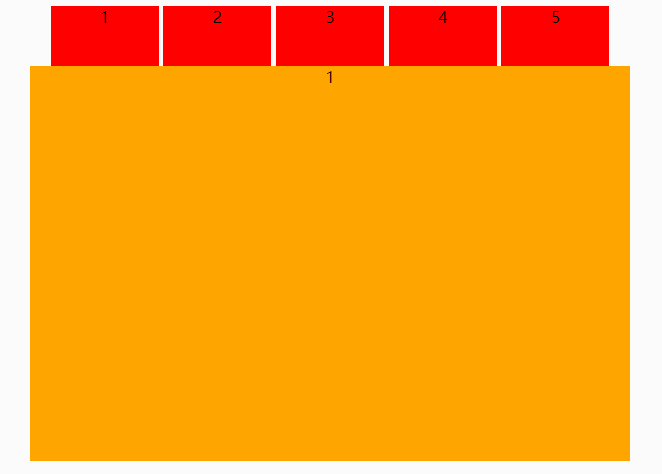
html<divclass="tou"><div>1</div><div>2</div><div>3</div><div>4</div><div>5</div><spanclass="d2"><divstyle="background:orange;">1</div><divstyle="background:yellow;left:100%;">2</div><divstyle="background:red;left:200%;">3</div><divstyle="background:green;left:300%;">4</div><divstyle="background:black;left:400%;">5</div></span></div>css*{text-align:center;}.tou{width:600px;margin:0auto;overflow:hidden;}.tou>div{width:18%;height:60px;background:red;display:inline-block;vertical-align:top;}.tou>span{display:block;width:100%;height:600px;position:relative;}.tou>span>div{width:100%;height:100%;position:absolute;}.d2{transition:.5s;}.tou>div:hover{background-color:yellow;}.tou>div:nth-of-type(2):hover~.d2{transform:translateX(-100%);}.tou>div:nth-of-type(3):hover~.d2{transform:translateX(-200%);}.tou>div:nth-of-type(4):hover~.d2{transform:translateX(-300%);}.tou>div:nth-of-type(5):hover~.d2{transform:translateX(-400%);}

html<divid="loading"style="text-align:center;"><divclass="loader"style="position:absolute;top:50%;left:50%;margin:-75px00-75px;width:150px;height:150px;"title="loading..."><svgversion="1.1"id="loader-1"xmlns="http://www.w3.org/2000/svg"xmlns:xlink="http://www.w3.org/1999/xlink"x="-100px"y="0px"width="150px"height="150px"viewBox="005050"style="enable-background:new005050;"xml:space="preserve"><pathfill="#00cec9"d="M25.251,6.461c-10.318,0-18.683,8.365-18.683,18.683h4.068c0-8.071,6.543-14.615,14.615-14.615V6.461z"><animateTransformattributeType="xml"attributeName="transform"type="rotate"from="02525"to="3602525"dur="1s"repeatCount="indefinite"></animateTransform></path></svg><h4id="information"style="color:#fff;font-size:large;">loading</h4></div></div>cssbody{background-color:#636e72;}js/*-------------------------------------------配置参数----------------------------------------*/vardata_group=newArray("loading","loading.","loading..","loading...");//需要的数组字符串varID="information";//操作IDvarspeed=400;//执行速率varEndvalue=4;//结束值varstartvalue=0;//初始值/*--------------------------------------------运算器----------------------------------------*/num=startvalue;vart=setInterval(function(){num++;if(num==Endvalue){num=0;}//执行内容document.getElementById(ID).innerHTML=data_group[num];},speed);
jsvarh=window.innerHeight,w=window.innerWidth;////禁用右键(防止右键查看源代码)window.oncontextmenu=function(){returnfalse;}////在本网页的任何键盘敲击事件都是无效操作(防止F12和shift+ctrl+i调起开发者工具)window.onkeydown=window.onkeyup=window.onkeypress=function(){window.event.returnValue=false;returnfalse;}////如果用户在工具栏调起开发者工具,那么判断浏览器的可视高度和可视宽度是否有改变,如有改变则关闭本页面window.onresize=function(){if(h!=window.innerHeight||w!=window.innerWidth){window.close();window.location="about:blank";}}document.onkeydown=function(e){e=window.event||e;varkeycode=e.keyCode||e.which;if(e.ctrlKey||e.altKey||e.shiftKey||keycode>=112&&keycode<=123){if(window.event){ietry{e.keyCode=0;}catch(e){}e.returnValue=false;}else{ffe.preventDefault();}}}











 中国互联网举报中心